Find Facebook groups where your customers are
Find the Facebook groups where your customers are already active, see why each one fits, and get them in a Google Sheet with an AI teammate named Noah.

Finding Facebook groups where your customers hang out usually means opening group after group, guessing which ones are active, and hoping a few of them turn out to matter. Noah, an AI teammate in Mices, does that research for you. He finds the Facebook groups where your customers are already active, explains why each one fits your business, and organizes everything in one Google Sheet. You tell Noah about your product, your website and your competitors, and he takes it from there.
Why search Facebook groups for customers
People in niche Facebook groups are already talking about the problems your product solves, which makes them a warmer audience than a cold ad. The hard part is finding the right groups among thousands of options and checking that each one is actually active before you join. Noah removes that research step: he picks the audiences to target based on your product, then checks group activity, privacy settings and member count so you don't have to.
What you need
- A Google account, so results can be saved to Google Sheets
- Your product, website and a few competitors, so Noah knows which audiences to target
- A Facebook login, optional, only needed if you want Noah to join groups on your behalf
- 1
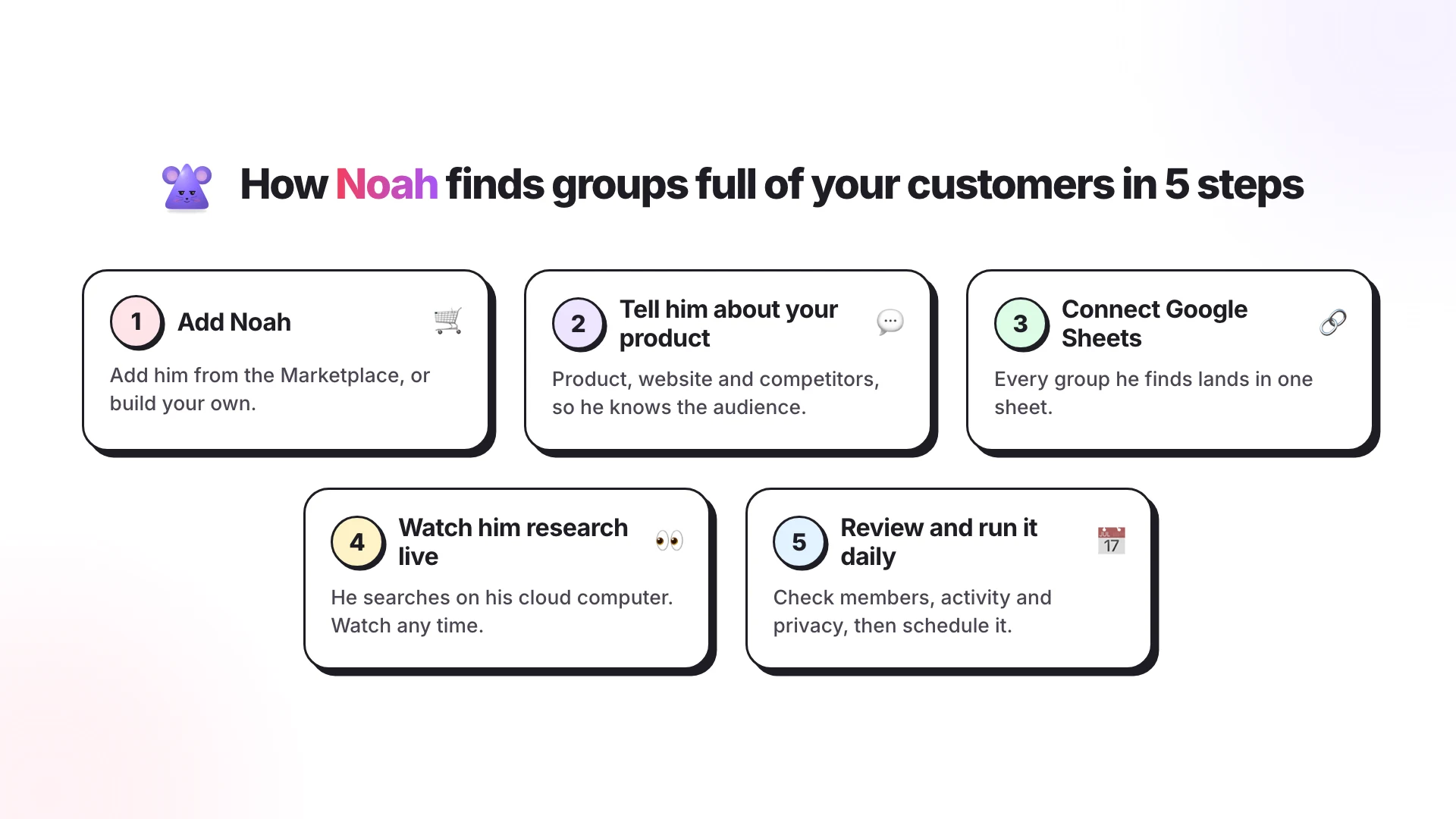
Add Noah to your workspace
Find Noah in the Mices Marketplace and add him as a teammate. You can also build your own version of Noah with custom instructions if you want to change how he works.
- 2
Tell Noah about your product
Give Noah your product, your website and your competitors. He uses this to work out which audiences and group types are worth targeting first.
- 3
Connect Google Sheets
Connect Google Sheets in one click so every group Noah finds lands in a sheet you can open right away, instead of a chat transcript you have to dig through.
- 4
Watch Noah research live
Noah searches on his own cloud computer, so the work keeps going even while your laptop is closed. You can watch every step he takes in real time.
- 5
Review the sheet and schedule daily runs
Check group name, link, member count, activity level and privacy setting, plus flags on anything Noah couldn't verify. Then schedule a daily run so new groups keep arriving without repeating ones you already have.
Find Facebook groups where my customers hang out
Make it run on its own
Schedule Noah to run every day, for example 5 new groups every morning at 9 AM. Each scheduled run only adds new groups, so your sheet keeps growing instead of repeating the same results. If you connect your Facebook account, Noah can also join groups for you directly, so you start as a member instead of just a name on a list.
Tips for better results
- Be specific about your product's niche. A description like "email marketing for Shopify stores" returns more useful groups than "marketing tool".
- Add 2 to 3 real competitors so Noah can look at the groups their customers already gather in.
- Review the flagged, unverified details before joining a group, especially member count and recent activity.
- Pair this with finding LinkedIn leads if Facebook groups are only one part of your outreach.
Questions people ask
Does Noah post in the groups for me?
No. Noah finds and researches groups, and can join them for you if you connect Facebook, but posting and engaging is still up to you.
Will Noah find the same groups every day?
No. Scheduled runs only add new groups, so your sheet keeps growing instead of repeating.
Do I need to connect Facebook?
Only if you want Noah to join groups automatically. Research and the Google Sheet work without it.
What if a group's details look wrong?
Noah flags anything he could not verify, so you can check group activity or member counts yourself before relying on them.
Is this different from just searching Facebook directly?
Yes. Searching Facebook only shows group names and member counts. Noah also explains why a group fits your specific product and checks that it is still active, which takes far more digging to do by hand.