MausBot alternative: Mices vs MausBot compared
MausBot or Mices? Compare setup, computers, teaching, teams and price, see where each one is better, and pick the AI agent app that fits how you work.

If you're looking for a MausBot alternative, you probably like the idea already: a team of AI helpers that use a computer, run on a schedule and work with your apps. MausBot and Mices both do that, in different ways. MausBot is a free, open-source app that runs the AI agent tools you already have, like Claude Code and Codex. Mices is an app where you build AI helpers (we call them mice) that work on their own cloud computer or on your spare one, with nothing to set up.
The short answer: if you want open source, self-hosting and lots of AI engines to pick from, MausBot is a great pick. If you want a mouse that does the work for you or your clients with nothing to install, gives every task its own space in the cloud instead of one shared machine, and learns a job by watching you, Mices fits better. Here's the honest side by side, checked on November 20, 2026.
What is MausBot?
MausBot (also called OpenMausBot) is an open-source app for running a team of AI bots in a chat window. It started in August 2026 as an open-source take on xAI's Grok Bot, and it's built by Milind Soni and Omkar Satpute. The code is on GitHub under the Apache 2.0 license, with about 25,800 stars and 287 contributors.
Each bot runs on an agent engine installed on your computer, like the claude, codex or grok command-line tools, using the logins and subscriptions you already pay for. MausBot lists 16 engines, plus API and local models. A bot can use a cloud Linux desktop from its partner Boat, a local virtual machine, your own server, or your own computer on macOS and Ubuntu. Bots connect to hundreds of apps through Composio, run on schedules and webhooks, and you can reach them from iPhone and Android companion apps or a live voice call.
The app is free. To keep bots working with your laptop closed, MausBot sells Cloud plans at $15, $49 and $99 a month, and a Team plan from $40 a month for two people. Your AI provider bills you for model usage.
What is Mices?
Mices is a desktop app for Mac, Windows and Linux where you build a small team of AI helpers called mice. Each mouse has its own role, instructions, files and tools. You give it a task in plain words, and it does the work with a real browser and your apps, then hands back the result: a sheet, a report, drafted emails.
Your mice share a cloud computer with a full desktop and a browser that stays signed in, so tasks keep running after you close your laptop. On Business and Agency you can also connect spare Mac, Windows or Linux computers. Mices works with apps like Gmail, Slack and Notion, or any tool with an MCP server, and you bring your own AI account: Claude or ChatGPT, an API key, or OpenRouter.
There's a free plan. Paid plans start at $19 a month, or $99 once for a lifetime plan, and every plan has a 7-day money-back guarantee.
MausBot vs Mices: how do they compare?
Here's everything side by side. A check means yes, a half mark means partly, and a cross means no.
| Compared | MicesFree plan, paid from $19 | MausBotFree, open source |
|---|---|---|
| Getting started | ||
| What it is | A desktop app with a free plan and paid plans | A free, open-source app (Apache 2.0) with optional Cloud plans |
| Setup | Yes AI built in: download the app and sign in to Claude or ChatGPT inside it | Partly Install an agent tool like Claude Code or Codex with a terminal command, sign in there, then restart the app |
| AI models | Partly Claude or ChatGPT, by login or API key; others through OpenRouter | Yes 16 agent engines, plus API and local models |
| Open source | No | Yes Apache 2.0, about 25,800 GitHub stars |
| Computers | ||
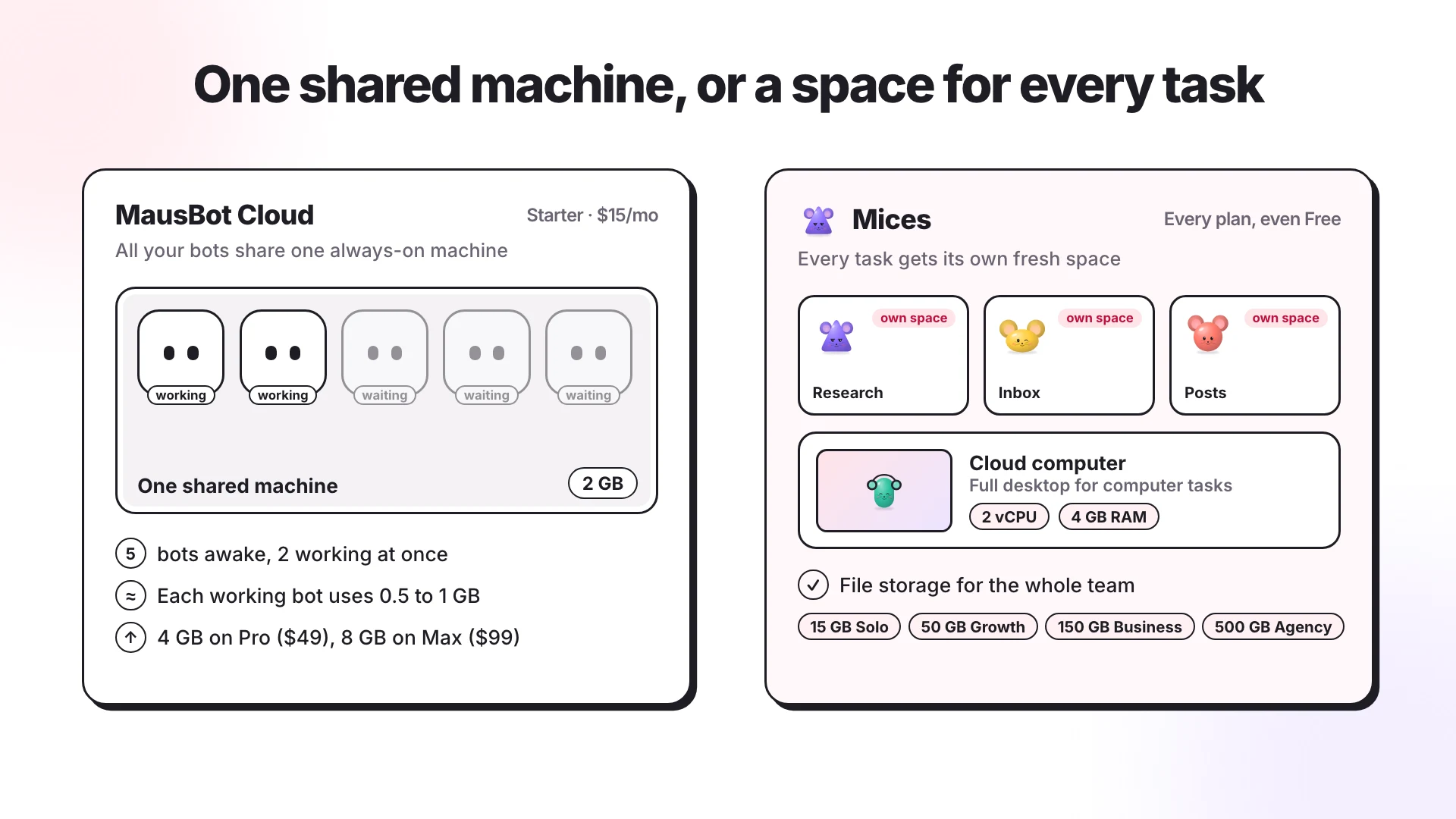
| How tasks share the cloud | Yes Every task gets its own fresh space, so one task never slows another | Partly One shared machine for all bots: 2 GB on Starter (2 working at once), 4 GB on Pro, 8 GB on Max |
| Cloud computer | Yes Linux desktop with 2 vCPU and 4 GB RAM on every plan; stays signed in | Yes Linux desktop from Boat that you can watch or take over |
| Cloud computers at once | Partly 1 per plan (2 on Agency), one task at a time | Yes As many as your bots need, within your hours |
| Your spare computer | Yes Mac, Windows or Linux, in your own Chrome (Business and Agency) | Partly macOS and Ubuntu (Xorg); not Windows yet |
| File storage | Yes 15 GB to 500 GB, by plan | Partly 10 GB, grows to 20 to 100 GB; team files 5 GB |
| Teaching and control | ||
| Teach by showing | Yes Record yourself doing the job, with your voice; it becomes a skill | Partly Teach a task turns a chat into a skill; it doesn't watch you do the job |
| Talk to it mid-task | Yes Tell it now, or send when done | Partly Open issue: messages can wait while a long step runs (Claude engine) |
| Approvals | Yes Asks before big steps; stop or take over any time | Yes Approval cards; coverage depends on the engine |
| Schedules | Yes Once, daily, weekly or monthly | Yes Schedules, webhooks and app events, on a calendar |
| Teams and agencies | ||
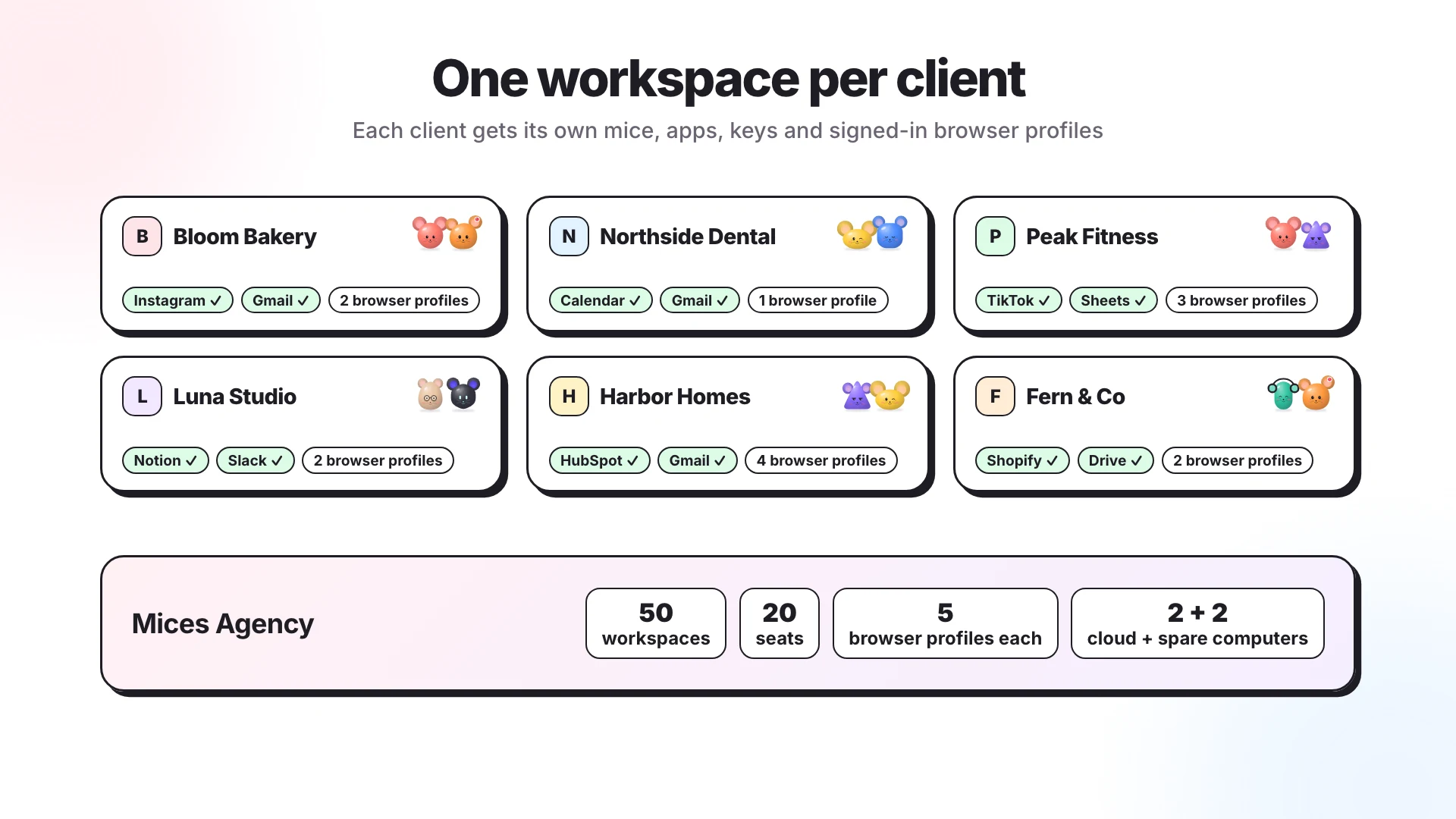
| Client workspaces | Yes Up to 50, each with its own mice, apps, keys and browser profiles | Partly One shared team |
| Seats | Yes Up to 20 on Agency | Yes Up to 50, at $20 each |
| Sell what you build | Yes Marketplace, you keep 70% | No Private team templates |
| Elsewhere | ||
| Phone app | No Coming soon | Yes iPhone and Android companions |
| Voice calls and group chats | No Coming soon | Yes Voice calls with your own OpenAI key; group chats |
| Price | ||
| Pay once | Yes Lifetime plans from $99 | No Monthly only |
| Refunds | Yes 7-day money-back guarantee | No None, except a duplicate charge |
Where MausBot is better
MausBot does some things better, and it's worth knowing them before you choose:
- It's free and open source. You can read every line, change it and run it on your own server at no cost. It also has a big community: about 25,800 GitHub stars and an 8,600-member Discord.
- More AI engines. MausBot runs 16 agent engines, like Claude Code, Codex, Grok, Cursor, Kimi, Antigravity and OpenCode, plus local models. Mices runs Claude and ChatGPT directly, and other models through OpenRouter.
- More cloud hours for the money. MausBot Pro gives 300 computer-hours a month for $49. Mices Growth gives 120 cloud hours and 25 computer hours for the same price. (Chats that run on your own computer don't use Mices hours at all.)
- More cloud computers at once. MausBot gives your bots as many cloud desktops as they need within your hours. A Mices plan has one cloud computer (two on Agency), and each runs one task at a time.
- Phone, voice and group chats today. MausBot has iPhone and Android companion apps, live voice calls with your own OpenAI key, group chats of bots, and Slack. In Mices these are on the roadmap.
Where Mices is better
Every task gets its own space, not one shared machine
This is the biggest difference, and it isn't on either pricing page in plain words.
MausBot Cloud gives you one always-on server, and all your bots live on it. They share its memory: 2 GB on Starter, 4 GB on Pro and 8 GB on Max. MausBot says a working bot uses about 0.5 to 1 GB, so on the $15 plan about 2 bots can work at once (5 can be awake), and the rest wait their turn. When a bot needs a screen and a browser, it borrows a separate cloud desktop from Boat, counted in computer-hours.
Mices has no shared server. Every cloud task starts in its own fresh space and closes when it's done, so a heavy job never slows down the others and there's no memory limit to share. When a task needs a screen, it uses your workspace's cloud computer: a full desktop with 2 vCPU and 4 GB of RAM on every plan, the free plan included, that keeps your logins and files between tasks. The files your mice make and the ones you upload get 15 GB on Solo, 50 GB on Growth, 150 GB on Business and 500 GB on Agency, shared by the whole team. MausBot's Team plan has 5 GB of shared team files.
Nothing to install: the AI is built in
Both apps start with a download and a sign-in, but MausBot needs one more piece first. Its bots run on agent tools installed on your computer, and its install guide lists the steps: install an agent tool like Claude Code or Codex from its maker (a terminal command, such as npm install -g @openai/codex), run it once in the terminal to sign in, then restart MausBot.
In Mices, the AI engines are built into the app. You sign in with your Claude or ChatGPT account (or paste an API key) right inside the app and give a mouse its first task. No terminal, and nothing extra to install or keep updated. One point to MausBot: its free app works without an account, while Mices asks you to make a free one.
Teach it by showing it, out loud
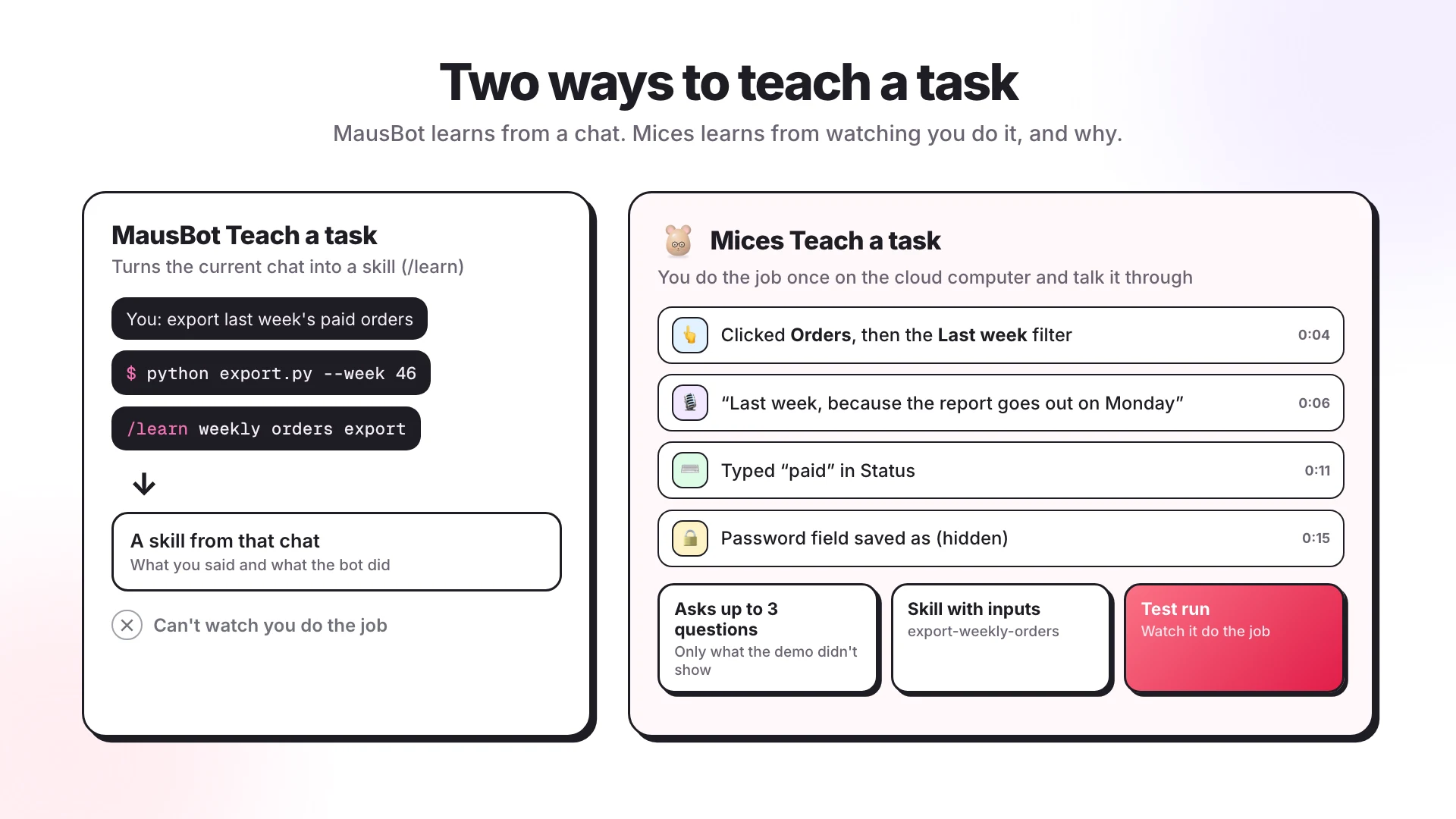
Teaching an agent by recording yourself is becoming common: Grok Bot, Claude and Codex all have a version, and Grok Bot's own docs say its recording doesn't include your voice. MausBot has a Teach a task button too, but it works from the chat: it starts /learn, which turns the current conversation (what you told the bot and what it did) into a skill. It can also save the clicks a bot made on your computer and replay them when you send the exact same request. It doesn't watch you do the job yourself.
In Mices, you press Teach a task on the cloud computer, do the job once and talk it through. Mices records the screen, every click with the button's label, what you type (password fields are saved as hidden) and your voice, lined up with each click. The mouse then tells you the steps it saw, asks up to three questions, writes a skill with inputs for the values that change, and offers a test run. Any mouse in the workspace can use the skill, on any model, and it can run on a schedule. Here's the full guide to teaching an AI agent a task.
Talk to it while it works
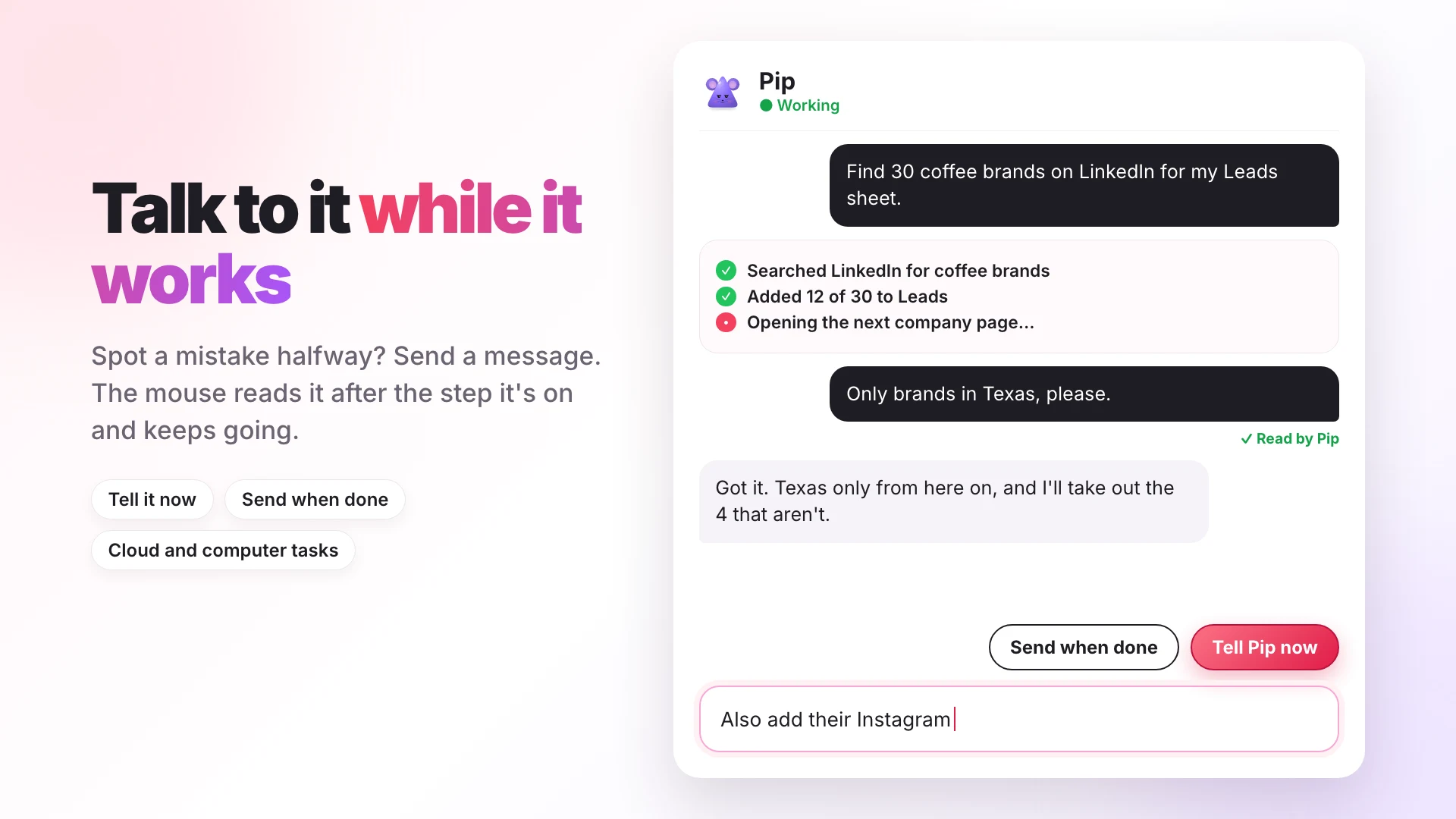
Spotted a mistake halfway through? In Mices you can message a mouse while it's working. Tell it now and it reads your message as soon as the step it's on ends, answers in a line and keeps going. Or pick Send when done to queue the message for after. This works for chats on your computer, cloud tasks and computer tasks, with Claude and ChatGPT.
MausBot has an open issue where, with the Claude engine, messages sent to a busy bot wait while a long step runs, and Stop is the only way out.
Your spare computer, Windows too
Both apps can work on your own computer. MausBot's README lists control of your own computer on macOS and Ubuntu (Xorg). Mices connects spare Mac, Windows and Linux computers on Business (1) and Agency (2). Mice work in the Chrome you're already signed in to, ask which profile to use, and a task there uses only a fifth of its time in cloud hours. See how to run AI agents on a Mac mini.
Made for agencies
MausBot's Team plan is one shared team: one machine, shared bots, roles and 5 GB of team files, at $40 a month for two people plus $20 for each extra person. Mices is built around workspaces. Agency gives you 50 workspaces, one per client, each with its own mice, apps, keys and up to 5 signed-in browser profiles, plus 20 seats, 2 cloud computers and 2 spare computers. Business gives you 10 workspaces and 5 seats. Read more about AI agents for agencies.
A backup when your AI account hits its limit
Claude and ChatGPT plans have usage limits. On Business and Agency, Mices keeps 1 or 3 backup AI accounts and switches to the next one when the first hits its limit, so a long task doesn't stop halfway.
Pay once, and get your money back if it's not for you
MausBot's Cloud plans are monthly, and its refund policy says payments aren't refunded, except a duplicate charge. Mices has monthly and annual plans, plus lifetime plans you pay for once, from $99. Every plan comes with a 7-day money-back guarantee. Lifetime plans include a one-time pool of hours; chats on your own computer are always unlimited, and extra hours never expire.
Sell what you build
Made a mouse that does a job well? List it on the Mices Marketplace for free or at your own price, and keep 70% of every sale. MausBot lets a team save bots as private templates. Here's how selling AI agents and workflows works.
Price compared
Both apps bill AI usage through your own account and don't mark it up. What you pay them for is the cloud: computers, hours, storage and seats. In Mices, a cloud hour is time a mouse works in the cloud and a computer hour is time on the full desktop. MausBot counts computer-hours on cloud desktops, and a small desktop counts as half an hour.
| Compared | MicesFree plan, paid from $19 | MausBotFree, open source |
|---|---|---|
| Free | 3 mice, 2 cloud hours and 1 computer hour to try | The app on your own computer, while it's on |
| Entry plan | Solo, $19 a month: 40 cloud + 8 computer hours, 5 mice, 15 GB | Starter, $15 a month: 100 computer-hours, a 2 GB machine, 5 awake bots |
| $49 a month | Growth: 120 cloud + 25 computer hours, 20 mice, 3 workspaces, 2 seats, 50 GB | Pro: 300 computer-hours, a 4 GB machine, unlimited bots |
| $99 a month | Business: 250 cloud + 50 computer hours, 10 workspaces, 5 seats, 1 spare computer, 150 GB | Max: 800 computer-hours, an 8 GB machine |
| Agencies and teams | Agency, $399 a month: 600 cloud + 125 computer hours, 50 workspaces, 20 seats, 2 cloud + 2 spare computers, 500 GB | Team: $40 a month for 2 people, plus $20 for each extra person, up to 50 |
| Pay once | Yes Lifetime: $99, $249, $499 or $1,999 | No Not offered |
| Extra hours | From $0.24 a cloud hour; they never expire | $0.05 per extra computer-hour on Team |
| Refunds | Yes 7 days, in full | No No refunds, except a duplicate charge |
Which one should you pick?
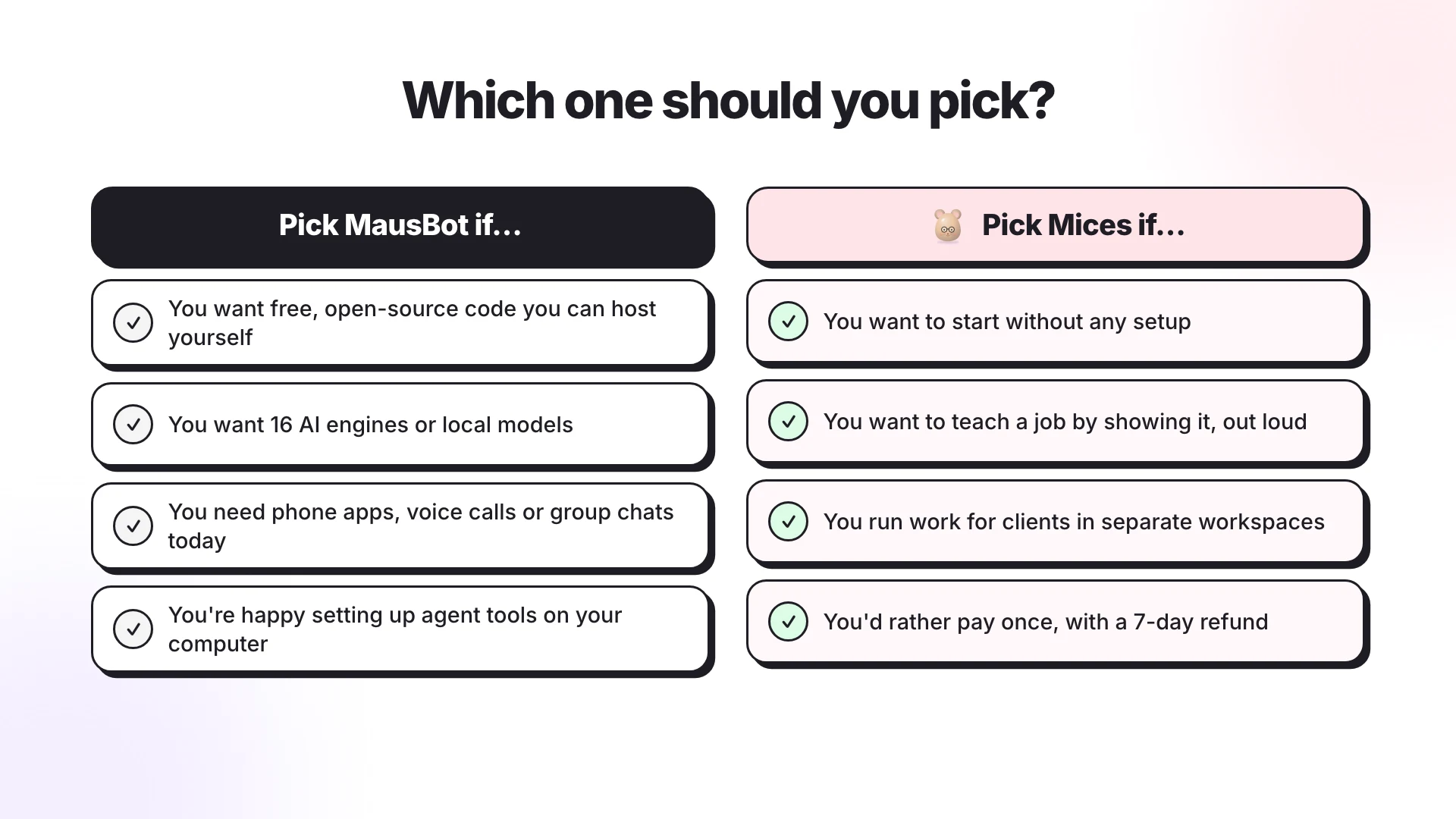
Pick MausBot if you want free, open-source code you can host yourself, you want lots of AI engines or local models, you need phone apps, voice calls or group chats today, and you're happy setting up agent tools on your computer.
Pick Mices if you want to start without any setup, you want to teach a job by showing it out loud, you run work for clients in separate workspaces, you want a spare Windows computer to help too, or you'd rather pay once with a 7-day refund.
Every weekday at 9am, open the competitor pricing pages listed in my Competitors sheet. If any price changed since yesterday, add a row with the competitor, the old and new price, a link and today's date. Then send me a two-line summary. Don't change anything else.
Questions people ask
Is MausBot free?
Yes. The MausBot app is free and open source under the Apache 2.0 license. You pay your AI provider for model usage, and the optional Cloud plans cost $15 to $99 a month.
Is Mices open source?
No. Mices is a closed app with a free plan and paid plans. You bring your own AI account, and Mices never marks up AI usage.
Can I use my Claude or ChatGPT subscription?
Yes, in both. Each lets you sign in with a Claude or ChatGPT plan or use an API key. MausBot also runs other agent tools like Grok and Cursor, and local models. Mices reaches other models through OpenRouter.
Do my agents keep working when my laptop is closed?
In MausBot, only on a Cloud plan or your own always-on server; the free app works while your computer is on. In Mices, tasks on the cloud computer and on a connected spare computer keep running with your laptop closed.
Which one is better for agencies?
Mices, if you need one workspace per client with separate logins and apps: Agency has 50 workspaces and 20 seats. MausBot's Team plan is one shared team for up to 50 people.
Sources
Checked on November 20, 2026.
- MausBot home page: features, engines, partners
- MausBot pricing: Cloud and Team plans, machine sizes, storage
- MausBot refund policy
- OpenMausBot on GitHub: license, stars, contributors, computer control by platform
- MausBot docs: installation: installing an agent tool first
- MausBot docs: skills: /learn and Teach a task
- MausBot docs: give a bot a computer
- OpenMausBot issue #3207: messages to a busy bot
- Grok Bot docs: teach a workflow by demonstration
- Mices pricing and roadmap