Sell AI agents and workflows you built
Turn a workflow you already run into an AI agent and sell it on the Mices Marketplace. Charge $10 to $299 once, or list it free, and keep 70% of every sale.

You can sell AI agents without building an app. In Mices, an AI helper is called a mouse, and a mouse that does one job well, like finding leads or writing posts, can go on the Mices Marketplace for free or at a price you set. You keep 70% of every sale.
The best part is that you probably have something worth selling already. If you run a workflow every week that saves you hours, that workflow is a product. Here's why that works, how to package it, and how you get paid.
Why sell a workflow instead of building an app?
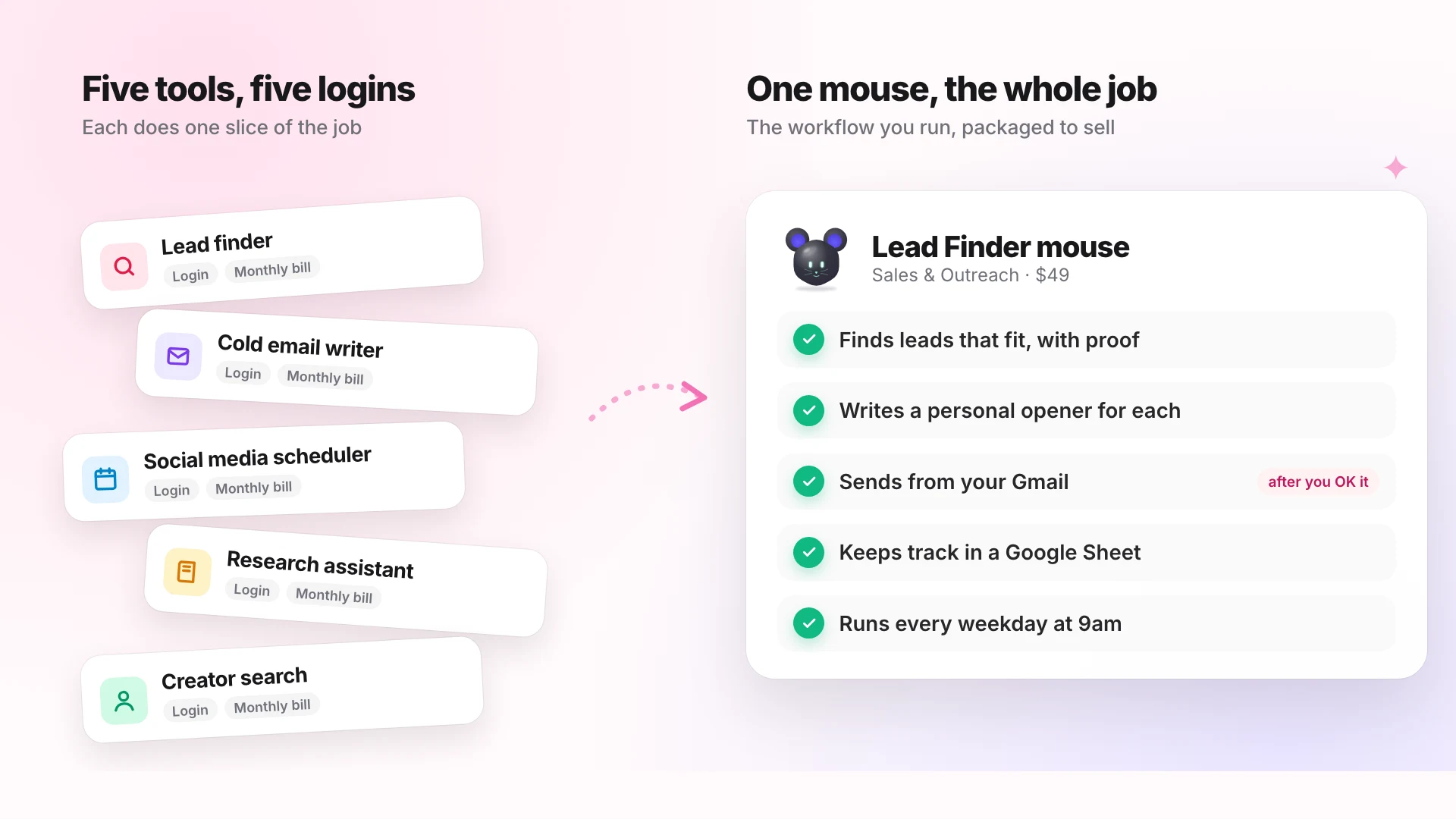
Look at how most people get work done with AI today. They pay for a lead finder, a cold email writer, a social media tool and a research assistant. Each one does a slice of the job, each one is another login and another monthly bill, and they rarely talk to each other.
A mouse can do the whole job, start to finish. It works with connected apps like Gmail, Google Sheets, Slack, HubSpot and Notion (or any tool with an MCP server), it uses a real browser on its own computer, and it follows written skills that say exactly how the job is done. You can even teach a mouse a task by showing it. So the workflow you stitched together across five tools can live inside one mouse.
That changes what it takes to sell it:
- Building an app means code, hosting, billing, support and a long wait before anyone pays.
- Selling a mouse means you write down how you do the job. Mices runs the app, the computer and the checkout.
To be fair, a mouse doesn't copy every feature of every tool. A dedicated cold email platform has things like inbox warmup and deliverability checks that a mouse doesn't do. But for the work itself (finding the right people, writing to them, sending from your inbox and keeping track in a sheet) a mouse handles it, and it does it the way you taught it.
What kinds of AI agents can you sell?
The easiest mice to sell are the ones that replace a tool people already pay for. A few examples, all built from jobs mice already do:
| People pay for | A mouse that... |
|---|---|
| A lead finder | Finds companies or people that fit, with proof, and fills a Google Sheet |
| A cold email writer | Researches each lead, writes a personal opener and sends from the buyer's Gmail |
| A social media tool | Designs carousels and writes captions for every network, every day |
| A creator search tool | Finds YouTube or Instagram creators who fit a product |
| A research assistant | Checks the same sources every week and writes the report |
If you want to see these jobs done step by step, start with finding B2B leads backed by real evidence, automating your social media carousels or finding YouTube creators to promote your product.
The Marketplace sorts mice into categories such as Sales & Outreach, Marketing & Content, Social Media, Research & Analysis, Data & Reporting, E-commerce, HR & Recruiting and Browser Automation. Pick the one a buyer would look in first. Agencies are a great audience, since they run the same jobs for many clients.
How to sell an AI agent on the Mices Marketplace
You don't fill in a long form. The mouse does most of the packaging itself, and you check it before anything goes live.
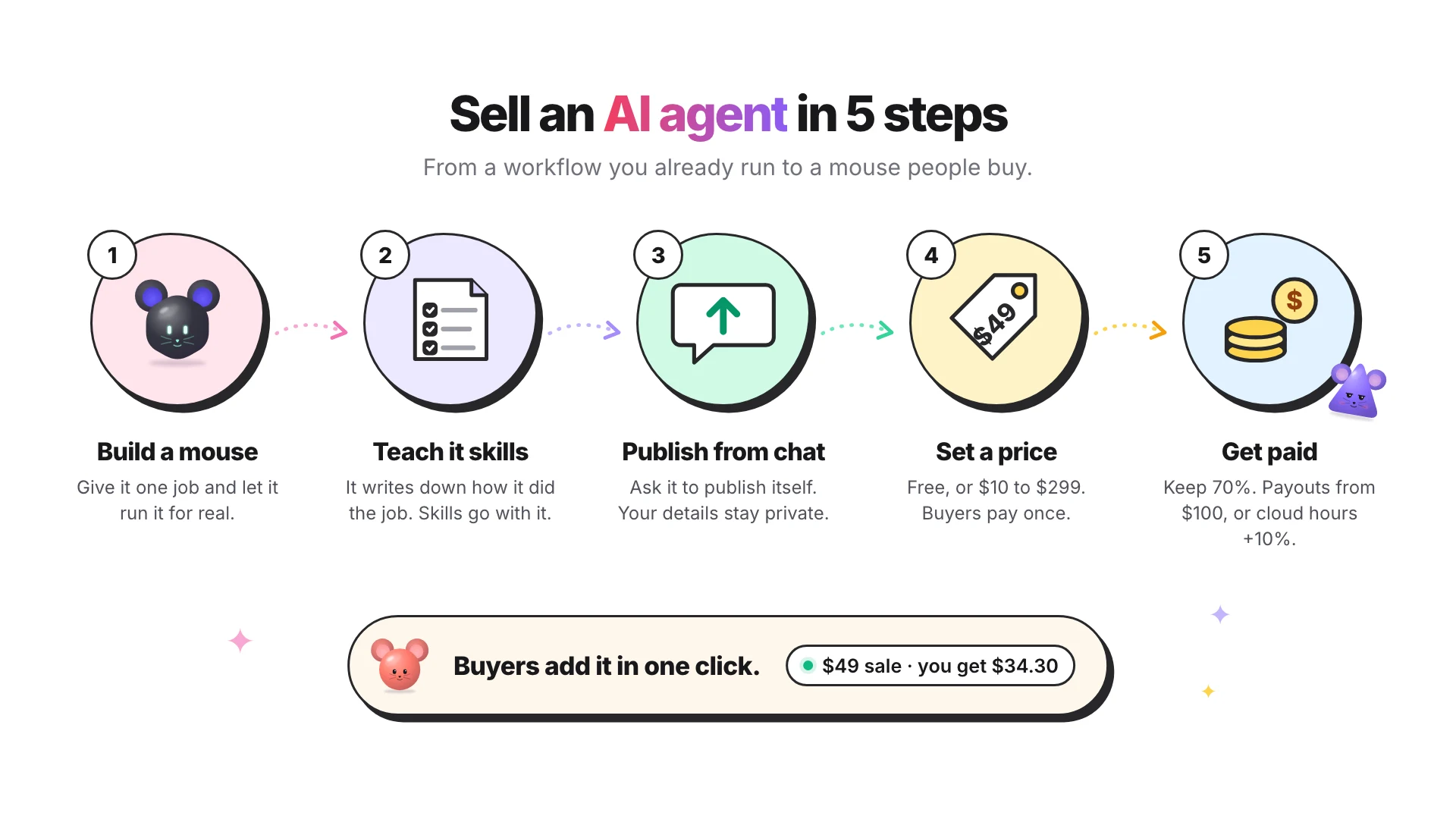
- 1
Build a mouse and let it do the job
Make a mouse for one job and run it for real a few times. If you ask a mouse to publish before it has ever done the work, it says so and offers to run it once first, because a mouse that has never worked makes a weak listing.
- 2
Ask it to publish itself
In the chat, ask the mouse to publish itself to the Marketplace. It looks back at how it did the work, writes the method as skills it keeps, moves your own details (your website, sheet, niche) into a private setup, and writes instructions anyone can follow.
- 3
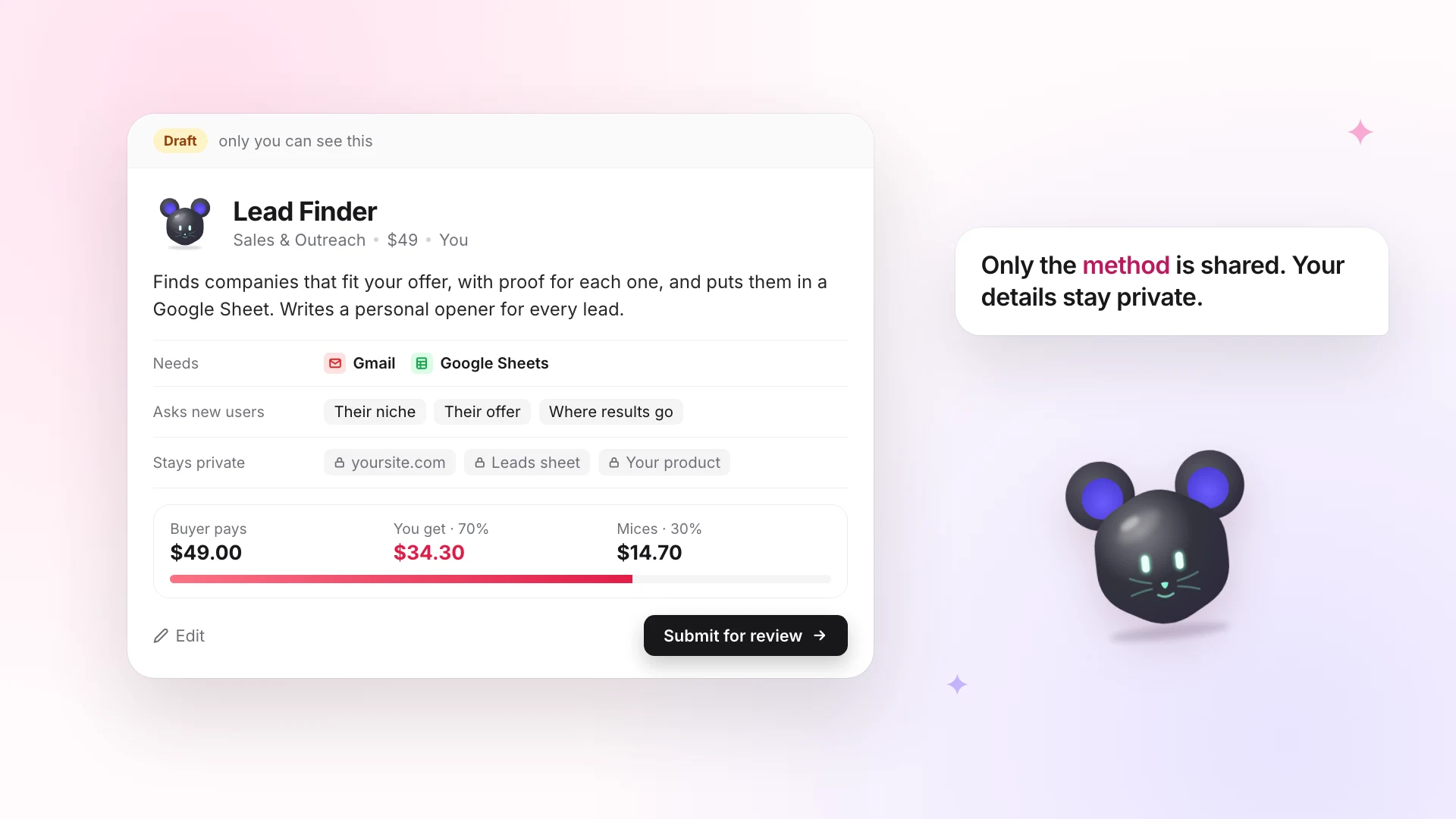
Check the listing card
The mouse shows a listing card in the chat. It has the description, the category, the apps it Needs with their logos, what it Asks new users, and what Stays private. Click Edit to change anything, and add a cover image or short video (1600 x 900) so it stands out.
- 4
Set a price
Under Price, pick Free or Paid. A paid mouse costs from $10 to $299, and buyers pay once. The card shows what the buyer pays, what you get (70%) and what Mices keeps (30%).
- 5
Submit for review
Click Submit for review. The card shows Submitted, Review and Live, and you get an email when it's live. If the review asks for changes, ask the mouse to fix them and click Resubmit.
Publish yourself to the Marketplace. Use how you found leads for me this week as your method. Keep my website, my sheet and my product private, and ask new users for their niche and their offer. Show me the listing card when it's ready.
What do buyers get, and what stays private?
Buyers see the price, the description, the apps it works with (marked Connected if they already have them) and the names of its skills. A free mouse has an Add to workspace button; a paid one says Buy once for its price.
Once they add it, they get the mouse's instructions and skills, plus every update you publish after that. They never get your setup, your chats, your files or your accounts. That's why the mouse moves your details out before it publishes: the method is shared, but whose work it was stays with you.
The first time a buyer runs it, the mouse asks for their own details, like their niche or where results should go, and keeps them in that buyer's private setup. They connect their own apps, so it sends from their Gmail and fills their sheet, never yours.
How do updates work?
Workflows get better, and so can your mouse. When you improve it, ask it to publish an update. The card then has a What changed box: one short line per change, such as "Openers quote the company's website".
An edit to a live listing goes back to review before it reaches anyone. Once it's approved, everyone who added your mouse gets an email and a note in their chat saying you improved it. They pick Update yourself in the chat (or just ask the mouse to update) to take the new version, and their own setup stays exactly as it was.
How do you get paid?
You keep 70% of every sale. Mices keeps 30% and pays the card fees out of its share. A $49 mouse earns you $34.30 a sale.
Your sales, your balance and what's been paid out show under Marketplace earnings on the Marketplace page. From there you have two ways to take your money:
- Email for a payout. Payouts start at $100, by PayPal, Wise or bank transfer, and arrive within 7 days. From $200 Mices pays the bank charges; under that they come off what you get.
- Email for cloud hours. Turn your balance into cloud hours for your own mice, with 10% extra on top of your plan's rate. This one needs a paid plan; free plans are paid in cash.
So three sales of that $49 mouse already add up to $102.90, enough to ask for your first payout.
Rules worth knowing before you sell
- Sales are final. Mice bought from the Marketplace can't be refunded, so a clear description and honest promises matter. Don't promise numbers the mouse can't keep, like "joins 50 groups a day".
- Only the person who made a mouse can list it.
- A mouse bought from the Marketplace can't be listed again. It's the buyer's copy, not theirs to resell.
- Edit from the workspace you published from. In your other workspaces, your listing shows up like any other mouse.
- Some apps aren't available. X (Twitter) can't be used as a connected app because of its API rules, so pick workflows that don't depend on it.
If your workflow needs a site where the buyer must be signed in, say so in the description. Buyers can run that kind of job on the cloud computer, or on a spare Mac mini or old laptop that's already signed in.
Questions people ask
How much can I charge for an AI agent on Mices?
You can list a mouse for free, or set a one-time price from $10 to $299 in whole dollars. Buyers pay once and get every update you publish after that.
How much of each sale do I keep?
70%. Mices keeps 30% and pays the card fees from its share. On a $49 mouse, you get $34.30 a sale.
Will buyers see my accounts or my data?
No. Buyers get the mouse's instructions and skills. Your setup, chats, files and accounts stay private, and the mouse moves your own details out before it publishes.
When and how do I get paid?
Email for a payout from Marketplace earnings once your balance reaches $100, and it's sent within 7 days by PayPal, Wise or bank. Or turn your balance into cloud hours with 10% extra if you're on a paid plan.
Can buyers get a refund?
No. Marketplace purchases are final, so buyers should read the listing and check the apps it uses before they buy. That's also why honest, specific descriptions sell better.